[AWS] Lambda layers - Fetch VPCs + Terraform Project 08
Package dependencies/libraries using Layers
![[AWS] Lambda layers - Fetch VPCs + Terraform Project 08](/_next/image?url=https%3A%2F%2Fcdn.hashnode.com%2Fres%2Fhashnode%2Fimage%2Fupload%2Fv1713466193636%2F3d49991a-d957-4b98-b258-0bff100023e5.png&w=3840&q=75)
Multi-Cloud & DevOps Engineer experience in enterprise and FinTech environments, specializing in cloud platforms, DevOps, IaC, and Python with a focus on FinOps, Security, and operational excellence.
Inception
Hello everyone, This article is part of The Terraform + AWS series, And it's not depend on any previous articles, I use this series to publish out AWS + Terraform Projects & Knowledge.
Overview
Hello Gurus, AWS Lambda is a compute service that lets you run code without provisioning or managing servers, Lambda runs your code on a high-availability compute infrastructure and performs all of the administration of the compute resources, Enables us to type-down your code that precisely meet your needs regardless of the servers management.
Today's Example will Deploy a Lambda layer version, and lambda that holds Python code fetching existing VPCs Details.
Building-up Steps
Today's will Build up a Lambda layer, and Lambda Python code that fetch existing VPCs details using boto3 library provided by AWS, The Infrastructure will build-up Using 𝑻𝒆𝒓𝒓𝒂𝒇𝒐𝒓𝒎.✨
The Architecture Design Diagram:
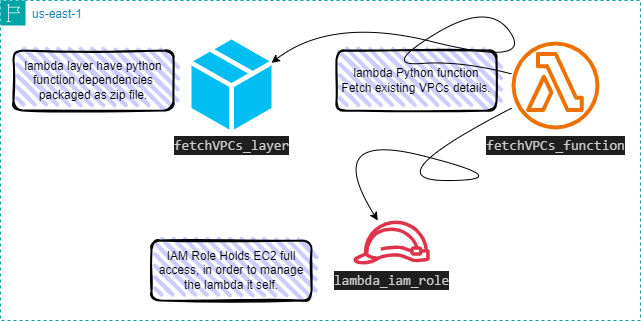
building-up steps Details:
Create a python script fetching existing VPCs using boto3 library.
Create a Bash script that packaging code dependencies as zip file i.e. layer package.
Deploy a Lambda layer holds the created zip package.
Deploy an IAM Role holds EC2 full access in order to mange the lambda it self.
Deploy a lambda function holds
Created Python script.
Deployed layer package.
Deployed IAM Role.
enough talking, let's go forward...😉
Clone The Project Code
Create a clone to your local device as the following:
pushd ~  # Change Directory
git clone https://github.com/Mohamed-Eleraki/terraform.git

pushd ~/terraform/AWS_Demo/15-lambda_layers
- open in a VS Code, or any editor you like
code . # open the current path into VS Code.
Prerequisites
include a manually created S3 Bucket that contains the Terraform state file and the layer package. The layer package path should then be specified in the Terraform layer configurations.
- I have created an S3 called
erakiterrafromstatefilesand uploaded the layer package underfetchVPCs_layer_package/Directory

Terraform Resources + Code Steps
Once you opened the code into your editor, will notice that the resources have been created. However will discover together how Create them steps by step.
Create Python script
Create a Python script fetch the existing VPCs details as the following code
- Create a new file under
scriptscalledfetch_vpcs.py
.tf files is a good way for less code complexity.import boto3
def lambda_handler(event, context):
ec_client = boto3.client('ec2', region_name="us-east-1")
all_available_vpcs = ec_client.describe_vpcs()
vpcs = all_available_vpcs["Vpcs"]
try:
# looping
for vpc in vpcs:
vpc_id = vpc["VpcId"]
cidr_block = vpc["CidrBlock"]
state = vpc["State"]
print(f"VPC ID: {vpc_id} with {cidr_block} state = {state}")
except Exception as error:
print(f"Error occurred: {error}")
- zip the Created python script
zip fetch_vpcs.zip fetch_vpcs.py
Create Bash script
Create a Bash script that packaging code dependencies as zip file.
- Create a bash script under
scriptscalledcreate_layer.sh
#!/bin/bash

# Create a Directory holds all function dependencies
mkdir scripts/fetchVPCs_dependencies; cd scripts/fetchVPCs_dependencies; mkdir python

# Create a virtual environment with python3.11
python3.11 -m venv fetchVPCs_depens_env

# Activate the virtual environment - Provide the Absolute  path
source ./mnt/c/Scripts/gitRepos/terraform/AWS_Demo/15-lambda_layers/scripts/fetchVPCs_dependencies/fetchVPCs_depens_env/bin/activate

# Install boto3 library inside the virtual environment - install all the libraries here - Or use requirements.txt
pip install boto3
pip install pg8000

# Deactivate the virtual environment
deactivate

# Copy the content of the installed library into python dir
cp -r fetchVPCs_depens_env/lib python/

# Create a zip file containing the current directory content
zip -r ../fetchVPCs_depens_packages.zip python/
- Run the script.
Make sure the zip file must following directory structure below:

Configure the provider
Start building Terraform resources
Create a new file called
configureProvider.tfConfigure the provider as the below code
# Configure aws provider
terraform {
  required_providers {
    aws = {
      source  = "hashicorp/aws"
      version = "~> 5.0"
    }
  }

  backend "s3" {  # Storing the Terrafrom statefile config into an s3 instead
    bucket  = "erakiterrafromstatefiles"  # Bucket name
    key     = "15-lambda_layers/lambda_layer.tfstate"  # Path and name of the statefile.
    region  = "us-east-1"
    profile = "eraki"
  }
}

# Configure aws provider
provider "aws" {
  region  = "us-east-1"
  profile = "eraki"  # remove this line if your using the default configs
}
Deploy Lambda Resources
- Create a new file called
lambda.tfand Deploy resources as the below steps
.tf files is a good way for less code complexity.Deploy lambda layer
# Deploy lambda layer resource - Create your layer zip file first by Running the the create_layer.sh script
resource "aws_lambda_layer_version" "fetchVPCs_layer" {

  # mention the layer pacakge from S3 Bucket instead
  # This is to avoid upload the Package every time you run your code.
  s3_bucket = "erakiterrafromstatefiles"                              # S3 Bucket name
  s3_key    = "fetchVPCs_layer_package/fetchVPCs_depens_packages.zip" # path to your Package

  layer_name = "fetchVPCs_layer"
  compatible_runtimes = ["python3.11"]
}
Deploy IAM Role
# Create an IAM role of lambda function
resource "aws_iam_role" "lambda_iam_role" {
  name = "lambda_iam_role"
  assume_role_policy = jsonencode({
    Version = "2012-10-17"
    Statement = [
      {
        Action = "sts:AssumeRole"
        Principal = {
          Service = "lambda.amazonaws.com"
        }
        Effect = "Allow"
        Sid    = "111"
      },
    ]
  })

  managed_policy_arns = [
    # Utilizing ec2 full access AWS managed policy in order to have access on managing lambda it self
    "arn:aws:iam::aws:policy/AmazonEC2FullAccess"
  ]
}
Deploy Lambda Function
# Deploy lambda function
resource "aws_lambda_function" "fetchVPCs_function" {
  function_name    = "fetch_vpcs_Function"

  # zip file path holds python script
  filename         = "${path.module}/scripts/fetch_vpcs.zip"
  source_code_hash = filebase64sha256("${path.module}/scripts/fetch_vpcs.zip")

  # handler name = file_name.python_function_name
  handler          = "fetch_vpcs.lambda_handler"
  runtime          = "python3.11"
  timeout          = 120

  # utilizing deployed Role
  role             = aws_iam_role.lambda_iam_role.arn

  # utilizing deployed layer
  layers = [aws_lambda_layer_version.fetchVPCs_layer.arn]
}
Apply Terraform Code
After configured your Terraform Code, It's The exciting time to apply the code and just view it become to Real. 😍
- First the First, Let's make our code cleaner by:
terraform fmt
- Plan is always a good practice (Or even just apply 😁)
terraform plan
- Let's apply, If there's No Errors appear and you're agree with the build resources
terraform apply -auto-approve
Check & invoke lambda
After code applied successfully it's time to check the run result of the function, let's begin
Open-up lambda console, and open your function.
Scroll down to code source section and press on Test
Type any event name , Then save, And press Test again.
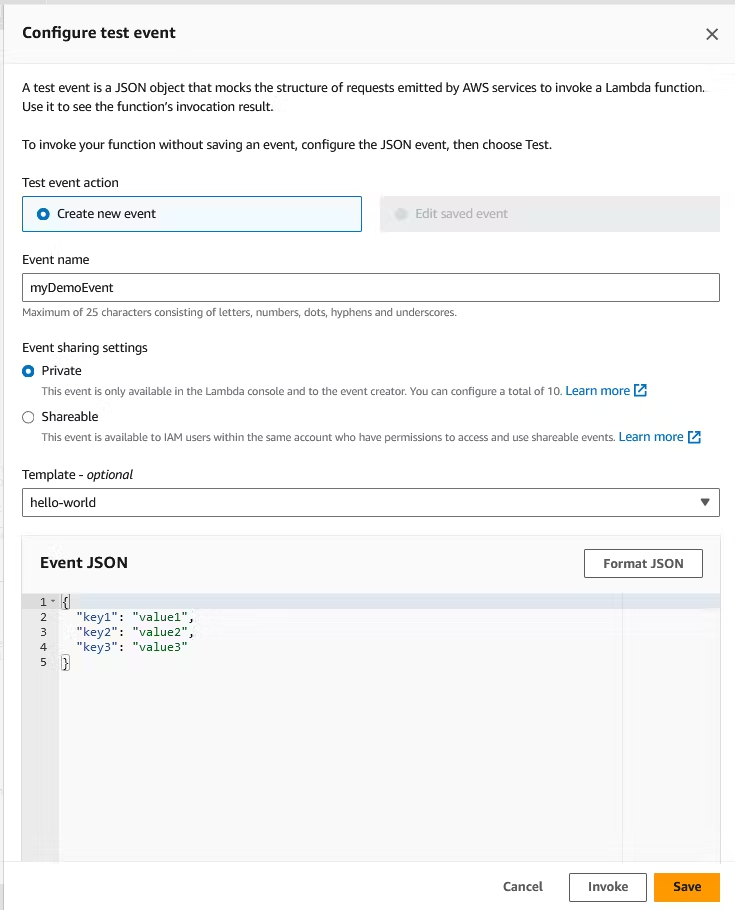
The output should be like the below.

Destroy environment
The Destroy using terraform is very simple, However we should first destroy the Access keys.
- Destroy all resources using terraform command
terraform destroy -auto-approve
That's it, Very straightforward, very fast🚀. Hope this article inspired you and will appreciate your feedback. Thank you.


